Updated: 19 November 2026


WinWinter App
WinWinter App: How to Get the Casino App on Android and iPhone
This guide explains how to install the WinWinter mobile application on Android and iOS devices. Learn about installation steps, device requirements, and using mobile payment methods like Apple Pay for faster transactions.
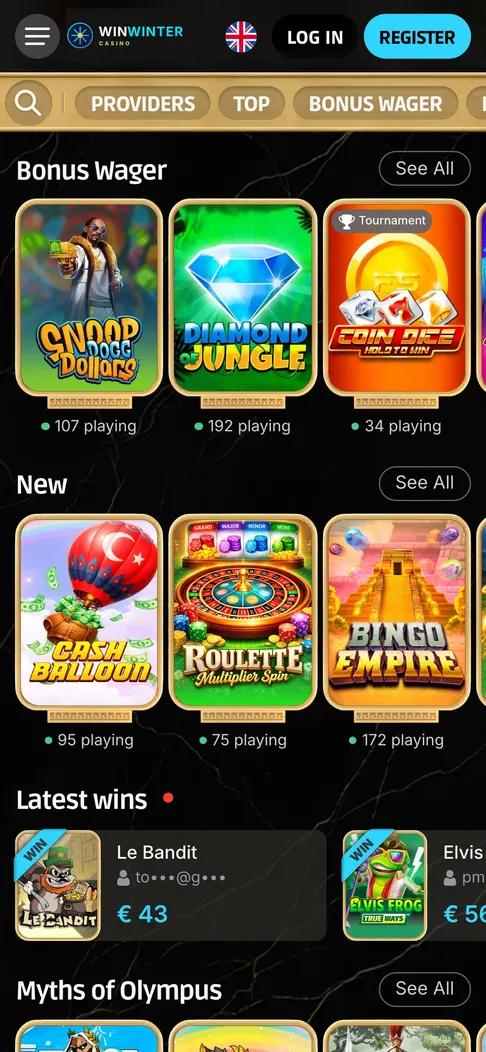
The WinWinter app on a phone: Bonus Wager slots, new releases and recent wins on one screen.
WinWinter app overview: key platform specifications
The WinWinter mobile experience relies on a dual-platform strategy designed to provide access to casino games, live dealer tables, and sports betting. Users can choose between installing the dedicated application on Android or iOS devices or accessing the platform via a standard mobile web browser. The core functionality, including the cashier, bonus activation, and account management, remains consistent across these platforms. Below are the technical and functional details for the WinWinter mobile setup.
| Item | Detail |
|---|---|
| Supported Platforms | Android and iOS |
| Download Method | Android via APK from site; iOS via App Store link |
| Size and OS Requirement | Android (60 MB, 8.0+); iOS (90 MB, 14.0+) |
| Key Mobile Functions | Casino, Live Casino, Sportsbook, Cashier, Bonuses |
| Login Method | Password, Fingerprint (Android), Face ID/Touch ID (iOS) |
| Payment Methods | Card (Visa/Mastercard), PayPal, Apple Pay, Google Pay, Skrill, Revolut, Crypto |
| Customer Support | 24/7 Live Chat, [email protected] |
WinWinter app functions: capabilities for mobile players
Mobile users access the same environment as desktop players, consolidated into a single wallet and account system. Once the app is installed, the primary benefit is the ability to maintain a session across multiple visits without entering credentials every time. After the initial sign-in, the application integrates with native biometric security features, such as fingerprint scanners on Android devices or Face ID and Touch ID on iPhones and iPads. This allows users to bypass the standard login screen while maintaining account security.
Betting on the go is facilitated by the sportsbook interface, which supports all major betting types including single, accumulator, and system bets. Users can place wagers on over 30 sports, ranging from football and tennis to niche markets, and follow live events with in-play statistics. The app includes cash-out options for many markets, providing control over bets before a match concludes. For those engaging with the casino section, the application provides access to over 3,000 games. This includes slots with features like Megaways and Bonus Buy, as well as a library of live dealer tables for roulette, blackjack, and baccarat. Because the app utilizes a single wallet, funds deposited for sports betting are immediately available for slots or live casino games without the need for transfers.
Managing finances is integrated directly into the app interface. Users can initiate deposits using a variety of methods, including Visa, Mastercard, and digital wallets like PayPal, Skrill, or Revolut. The application also supports crypto payments, covering BTC, ETH, USDT, and LTC. Withdrawals are requested through the same cashier section. While the casino processes these requests within 3 business days, the app allows for tracking the status of these transactions. Users receive push notifications regarding their account status, including withdrawal progress, which is a feature unavailable in the mobile browser version. These notifications also serve to alert users about bonus opportunities, such as free-spin drops or weekly reload reminders. To use this, one must activate the offer within the cashier menu. These alerts are opt-in, and players can disable them in the phone settings if they prefer not to receive them.
WinWinter app installation: getting started on mobile
The process for acquiring the WinWinter mobile application varies slightly depending on the operating system. For users who prefer a dedicated installation over the browser version, the process is straightforward but requires specific steps depending on the device. Those who use WinWinter app for Android will need to download an installation file directly from the mobile site, as the application is not distributed through the Google Play store. This process involves adjusting security settings on the device to allow installs from unknown sources, a one-time configuration required to complete the setup. Once the APK file, which is approximately 60 MB in size, is downloaded and the permission is granted, the app installs onto the home screen.
Users of Apple devices follow a different procedure. The application is accessed via a direct link provided on the WinWinter mobile site, which redirects to the App Store. The installation follows the standard procedure for any iOS application. This package is roughly 90 MB and requires iOS 14 or newer. Both platforms ensure that the full suite of services, including the sportsbook, cashier, and 24/7 live chat support, are available once the app is launched. Regardless of the installation method, the account creation process remains a two-step procedure that can be completed within approximately 3 minutes. It requires providing an email address, setting a password, and submitting personal details like full name, date of birth, and contact information. Once the email confirmation link is clicked, the account is ready for use on any device, including the app.
WinWinter mobile software: Android vs iOS differences
The experience on Android and iOS shares the same core features, but the methods of distribution and system integration differ. Android users rely on an APK file downloaded from the WinWinter mobile site. Because this bypasses the standard app store distribution model, it requires the phone to be configured to accept installations from unknown sources. This setting is found in the device’s security preferences. Updates for the Android version are delivered via in-app prompts, ensuring users can upgrade to the latest version without navigating to a browser again. The biometric login on Android utilizes the fingerprint scanner, enabling access to the account with a touch rather than typing a password.
iOS users download the application through the App Store using a link provided on the mobile site. This is a standard process, and updates are handled automatically through the App Store’s update mechanism. The biometric integration on iOS makes use of Face ID or Touch ID, depending on the iPhone or iPad model. While both applications support push notifications for promo offers and withdrawal updates, the implementation reflects the native behavior of the respective operating systems. For example, the specific notifications for free-spin drops or match reminders appear in the standard notification centre on both platforms. It is worth noting that the mobile browser experience for both operating systems does not offer these push notifications or biometric features, making the dedicated app the more functional choice for regular users who prefer to stay logged in or receive instant updates about their accounts.
System requirements for mobile play
The hardware requirements are designed to keep the application accessible for most modern devices. For Android, the device must run version 8.0 or newer. The application requires approximately 60 MB of storage space, although additional space is necessary for cache data generated during gameplay. A stable internet connection is required for real-time betting and live casino streaming. For iOS devices, the requirement is version 14.0 or newer. This includes most iPhones and iPads released in recent years. The iOS application size is around 90 MB. Performance on both platforms depends heavily on the quality of the network connection, as the live casino and sports streaming components require consistent bandwidth to prevent lag during betting or gameplay. Both apps are optimised to run efficiently on these minimum requirements, but older devices may experience slower load times for complex, graphics-heavy slot titles.
WinWinter mobile browser: an alternative to installation
Some users may prefer not to install a dedicated application, choosing instead to use the mobile browser version of the platform. This approach involves navigating to the site directly in a smartphone’s web browser, such as Safari or Chrome. The mobile site is built with a responsive design, meaning it automatically adjusts to the screen size of the device. This provides a similar interface to the app, with access to all 3,000+ games, the sportsbook, and the full cashier system. The primary advantage of this method is that it requires no installation, no storage space on the device, and no manual updates. It is a suitable option for players who only access the casino occasionally or who do not wish to manage app permissions.
There are clear trade-offs, however. The mobile browser version does not support biometric login, meaning the user must input their email and password each time they visit, unless the browser’s own password manager stores these credentials. More importantly, the browser version lacks push notifications. This means users will not receive alerts regarding free-spin drops, promo offers, or instant updates on withdrawal statuses. If a user intends to utilize the push-based bonuses or prefers the convenience of fingerprint or Face ID access, the browser version is less effective. Furthermore, because the browser relies on the device’s internet cache, it can occasionally be slower to load content compared to the app, which stores certain interface elements locally. For most day-to-day betting and gaming, the mobile site is fully functional, but it lacks the alert-driven features that are built into the Android and iOS applications.
WinWinter mobile banking: payments and withdrawals
The cashier is designed to facilitate transactions across all mobile platforms, with the same payment methods available regardless of whether the user is in the app or the mobile browser. For deposits, the casino accepts Visa and Mastercard, alongside e-wallets like PayPal, Skrill, and Revolut. Users who prefer mobile-specific payment solutions can utilize Apple Pay on iPhones or Google Pay on Android devices. These methods are typically faster to initiate within the app environment. All deposits are processed instantly, with a minimum transaction amount of €15. Before any withdrawal can be processed, the casino requires that the deposited funds be turned over at least 3 times.
Withdrawal times depend on the chosen method, with the casino aiming to approve all requests within 3 business days, though this is usually accomplished within 24 hours provided that the KYC process is complete. Once the casino approves the withdrawal, the time until the funds appear in the user’s account varies. PayPal and Skrill are among the fastest, typically arriving within 24 hours of approval. Crypto withdrawals are usually processed within 1 hour. Users opting for Revolut can expect the funds within 1 business day, while Visa, Mastercard, Apple Pay, and Google Pay withdrawals return to the linked card within 1 to 3 business days. The platform does not charge fees for these transactions, although the financial institution handling the transfer might have its own policy. Withdrawal limits are set at €5,000 per day and €20,000 per month. Available methods can vary based on the user’s location, and the cashier interface will display only those relevant to the player’s account. Regardless of the method used, the withdrawal is generally directed back to the original source of the deposit whenever possible.
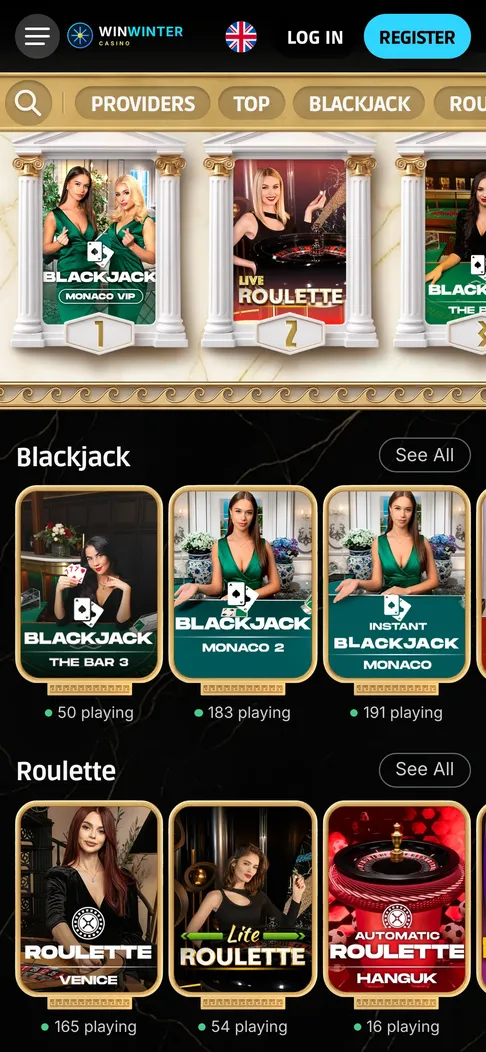
Live blackjack and roulette tables in the mobile lobby, opened with one tap.
WinWinter app: short answers
How do I install the WinWinter mobile application?
Android users download the APK file directly from the WinWinter mobile site for version 8.0 or higher. iOS users find the download link on the mobile site for installation on devices running iOS 14 or later.
Can I use fingerprint or Face ID to sign in?
Yes, both Android and iOS apps support biometric login after you complete the initial password sign-in. This feature allows for faster access compared to the mobile browser version, which does not support biometrics.
What are the benefits of enabling push notifications?
Push notifications keep you updated on bonuses, withdrawal status, and free-spin drops. You can opt-in to receive these alerts directly in the app, a feature not available when using the mobile browser.
What are the deposit and withdrawal limits?
The minimum deposit and withdrawal amount is €15. You can withdraw up to €5,000 per day and a maximum of €20,000 per month without paying extra fees.
What happens if I enter the wrong password too many times?
If you enter the wrong password five times, the system will lock your account for 30 minutes. You can reset your password using the link sent to your email, which remains valid for 60 minutes.