Updated: 19 November 2026


WinWinter Login — Fast Sign In to Your Casino Account
Access your personal account securely using biometric authentication like Face ID or fingerprint login methods. Follow this straightforward guide to regain account access and enjoy fast sign-in to your gaming profile today.
After the first password sign-in the app can open your account with a fingerprint or Face ID.

WinWinter login: at a glance
Accessing your casino account is the first step toward engaging with the 3,000+ games and the sportsbook available on the platform. The system operates on a single-wallet basis, meaning your funds and account status remain consistent across the casino, live dealer games, and sports betting sections. When you access the site or the application, you enter the same environment that provides your history, balance, and active bonuses. You need to be 18+ to operate an account. The account currency for UK users is set exclusively to pound sterling (£), and all financial transactions are processed in this currency to avoid exchange rate complications. While the mobile web version functions through a browser, installing the app offers distinct advantages regarding speed and security. You can find the summary of login requirements and support methods in the table below.
| Item | Detail |
|---|---|
| What you need | Registered email address and password |
| Where to log in | Web browser, Android app, iOS app |
| Fast/biometric login | Supported in app (Fingerprint, Android; Face ID / Touch ID, iOS) |
| Password reset | Yes, available via automated email link |
| Support | [email protected] |
WinWinter login: step by step guide
The process for entering your account depends on the device you are using. On the mobile website, you navigate to the main page and locate the sign-in button. You enter your registered email address and your password, then confirm the action. This browser-based method does not store your credentials locally, requiring you to enter them each time you access the site. The application provides a more efficient approach through biometric integration.
- Launch the WinWinter app on your Android or iOS device.
- Enter your email and password for the initial sign-in process.
- The app establishes a secure session.
- You will be prompted to enable biometric login, such as fingerprint scan on Android or Face ID or Touch ID on iOS devices.
- Once enabled, future access requires only the biometric verification, skipping the manual entry of credentials.
The application for Android requires Android 8.0 or newer and involves downloading an APK from the mobile site, as it is not listed on Google Play. You must permit the one-time installation of unknown apps on your phone to complete this. The iOS version requires iOS 14 or newer and is installed via the App Store link provided on the mobile site. Both apps are roughly 60 MB to 90 MB in size. Using the app also allows you to opt-in for push notifications regarding promo offers or free-spin drops. If you ever need to review the specific speeds for your payouts, information regarding the WinWinter withdrawal time is available to you after you have signed in.
WinWinter login: password recovery
If you find yourself unable to access your account due to a forgotten password, the system provides an automated recovery path. This process is triggered by selecting the “Forgot password” link on the login screen. You input the email address registered to your WinWinter account, and a reset link is sent to that inbox within a few minutes. You must use this link within 60 minutes, as it expires for security reasons. Once you click the link, you are directed to a page where you can set a new password. If you do not receive the email, check your spam or junk folders first. Should the email fail to arrive, you can send an inquiry to [email protected], where the support team processes requests during working days. This independent guide is not the casino, so our team does not have access to your personal account data or password reset triggers, but we can offer general assistance on the process.
WinWinter login: troubleshooting
Access issues often arise from simple missteps that are easily corrected. The system is designed to maintain security, which means that five consecutive wrong password attempts will lock your account for 30 minutes. This is a standard safety measure. If you are locked out, you must wait for the timer to expire before attempting another login.
- Incorrect password: Ensure your keyboard layout is set to English and that Caps Lock is off. Re-type the credentials carefully.
- Verification issues: If you have recently created an account, ensure you have clicked the confirmation link sent to your email during the two-step registration. Without this confirmation, access may be restricted.
- Outdated application: If the app refuses to log you in, check if there is an update pending. Android users should look for in-app prompts, while iOS users should check the App Store for a newer version.
- Account suspension: If the account remains inaccessible after the 30-minute lock-out period, there may be an issue with your KYC status. The casino requires documents like a photo ID and proof of address. Checks usually take 24 to 48 hours. Contact [email protected] if you suspect your account is suspended due to verification.
- Regional limitations: While the site is accessible in the UK, using a VPN or attempting access from a restricted location will trigger a login block.
Remember to gamble responsibly. If you find that you are struggling to control your activity or the time spent on the platform, you can use the built-in safer gambling tools in your account settings, such as session reminders, deposit limits, or a time-out. You can also contact the National Gambling Helpline (run by GamCare) at 0808 8020 133, which is free and available 24/7.
WinWinter login: account features
Once you have successfully logged in, you gain access to your full dashboard. This includes your current balance, which updates in real-time, and access to the cashier for deposits and withdrawals. All deposits are instant, using methods like Visa, Mastercard, PayPal, Apple Pay, Google Pay, Skrill, Revolut, or cryptocurrencies like BTC, ETH, USDT, and LTC. Your account tracks your wagering progress for active bonuses, such as the welcome package of up to £1,800 plus 100 free spins. You can view your bonus status directly in the cashier area where bonus codes, if applicable, would be entered.
In the app, you may receive push notifications for reload reminders or free-spin drops. These are sent to registered app users periodically, typically about once a week. You must activate these offers in the cashier. You can also toggle the display of betting odds between decimal and fractional formats within your settings menu. The sportsbook offers betting on over 30 sports, ranging from football to Formula 1, with a minimum stake of £0.10. Everything you do within the account, from placing a bet on a sports match to playing a slot with a minimum spin value of £0.20, is recorded in your history, which is available in your profile section.
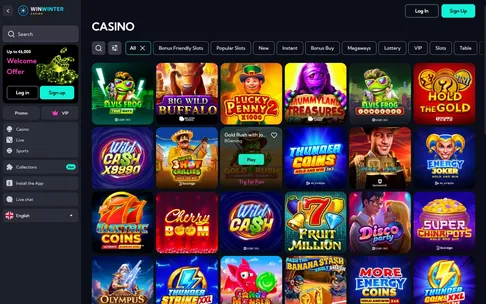
Once you are logged in, the lobby, cashier and bonuses are one tap away.
WinWinter login: quick answers
What should I do if my WinWinter account gets locked after wrong passwords?
Entering the wrong password five times locks your account for 30 minutes for security purposes. If you need immediate assistance after this period, you can contact support at [email protected].
Can I use Face ID or fingerprint login on the WinWinter app?
Yes, after completing your first password sign-in, you can enable fingerprint or Face ID login for faster access. This biometric feature is available on both the Android and iOS apps.
How long is the password reset link valid for?
When you request a password reset, the link sent to your registered email is valid for 60 minutes. Make sure to check your inbox and spam folder promptly to create a new password.
What payment methods can I access immediately after logging in?
Once logged in, you can manage your £ balance using methods like Visa, Mastercard, PayPal, Apple Pay, Google Pay, Skrill, Revolut, and various cryptocurrencies. Minimum deposits and withdrawals start at £15 with no fees applied.
How do I check my withdrawal status through my account?
You can view your withdrawal status directly in your account dashboard after logging in. Withdrawals typically undergo approval within 24 hours after KYC, with payout speeds ranging from 1 hour for crypto up to 3 business days for cards.